Deep Packet Inspection (DPI) is a powerful network security and monitoring technology that examines the full contents of data packets as they pass through a monitoring point. Unlike basic packet filtering (which looks at headers only), DPI inspects payloads to identify applications, detect threats, enforce policies, and shape traffic. This blog covers DPI fundamentals, what it detects, practical use cases (positive and negative), drawbacks, mitigation strategies, common ports and file formats, useful tools and Python libraries, plus resources to explore.
What is Deep Packet Inspection (DPI)?
DPI is the method of examining the full content (headers + payload) of data packets traversing a monitored network checkpoint. ISPs, enterprises, and security appliances use DPI to:
- Track and analyze network traffic in real time (even when payloads use encryption metadata).
- Apply actions such as allowing, blocking, throttling, or prioritizing traffic.
- Detect malicious or policy-violating payloads before they reach endpoints.
Short definition: DPI inspects packet payloads (not just headers) to understand application behavior, threats, and policy violations.
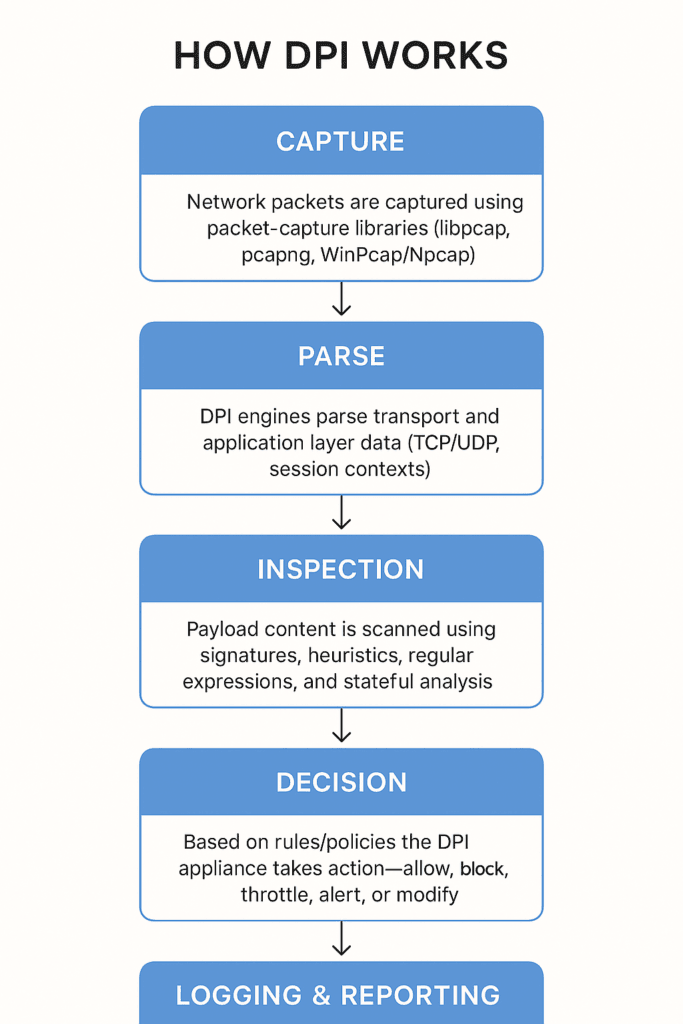
How DPI Works (high level)
- Capture: Network packets are captured using packet-capture libraries (libpcap, pcapng, WinPcap/Npcap).
- Parsing: DPI engines parse transport and application layer data (TCP/UDP, session contexts).
- Inspection: Payload content is scanned using signatures, heuristics, regular expressions, and stateful analysis.
- Decision: Based on rules/policies the DPI appliance takes action—allow, block, throttle, alert, or modify.
- Logging & Reporting: Events are logged for compliance, forensics, and analytics.
What DPI Monitors & Controls
Deep Packet Inspection (DPI) goes far beyond traditional network firewalls or basic packet filters that only check headers. It inspects both metadata (packet headers, protocol information, routing data) and payloads (the actual data being transmitted). This dual-level visibility allows DPI systems to understand what the traffic truly is, not just where it’s coming from.
Here’s how DPI enables powerful monitoring and control operations across a network:
🔍 Speed Regulation (Traffic Shaping)
DPI can speed up or throttle specific types of traffic based on policies or business priorities.
For example:
- Prioritizing VoIP or video conferencing traffic to ensure smooth communication.
- Slowing down bandwidth-heavy downloads, torrents, or streaming services during peak hours.
This process, known as Quality of Service (QoS) or traffic shaping, ensures optimal bandwidth utilization and a better user experience.
🚫 Blocking or Filtering Suspicious Traffic
By scanning packet payloads, DPI can detect and block malicious or unwanted data flows in real time.
This includes:
- Malware and phishing payloads
- Unauthorized applications (e.g., banned social media, P2P)
- C2 (command-and-control) communications from compromised devices
Because DPI looks inside the packet rather than just at port numbers, it can identify threats that disguise themselves under common protocols like HTTPS or DNS tunneling.
⚙️ Prioritizing Critical Applications
Enterprises use DPI to identify and prioritize mission-critical traffic.
For instance:
- Banking applications or ERP systems can be marked for high priority.
- Background updates or non-essential cloud sync tasks can be deprioritized.
This dynamic traffic management ensures that business operations stay fast and uninterrupted, even under heavy network load.
🧠 Intrusion Detection & Prevention
DPI acts as the backbone for Intrusion Detection Systems (IDS) and Intrusion Prevention Systems (IPS).
It helps detect:
- Unusual data patterns indicating attempted exploitation.
- Signature-based threats like known malware payloads.
- Behavioral anomalies across multiple packets (e.g., slow port scans or fragmented attacks).
Once detected, the DPI appliance can alert administrators, drop packets, or block the attacker’s IP, depending on configuration.
🧾 Policy Enforcement & Compliance Monitoring
Organizations and ISPs often implement content filtering policies — such as blocking adult content, enforcing data loss prevention (DLP), or restricting access to certain categories of sites.
DPI enables such enforcement by reading the content being transmitted and verifying whether it adheres to organizational, legal, or regulatory policies.
💡 Summary
Every packet passing through a DPI-enabled checkpoint is thoroughly inspected before it’s allowed to participate in data transfer.
This ensures that only authorized, secure, and policy-compliant packets traverse the network — safeguarding users, data, and system integrity
Things DPI Detects
- Malware (payload signatures, suspicious binaries)
- Data exfiltration attempts (unusual flows, covert channels)
- Content policy violations (copyrighted content, prohibited material)
- Criminal command-and-control communications (C2 patterns)
Positive (Legitimate) Use Cases
- Blocking malware and malicious traffic
- Preventing data leaks and enforcing DLP rules
- Content policy enforcement and regulatory compliance
- Intrusion Detection/Prevention (IDS/IPS) and network forensics
- Traffic optimization and QoS shaping for mission-critical apps
Negative / Abusive Use Cases
- Network exploitation and packet injection
- Data scraping and large-scale network hijacking
- Mass surveillance or invasive content inspection without consent
- Targeted censorship or throttling of specific services
Disadvantages & Limitations
- Latency & performance: DPI can introduce processing delays, especially on remote or underpowered infrastructure.
- Higher resource usage: Inspecting payloads consumes CPU, memory, and I/O compared with header-only inspection.
- Bypass risks: Encrypted tunnels (VPNs, TLS 1.3 with ESNI/eSNI-like extensions) and obfuscation can limit DPI visibility; misconfigured systems may skip inspection.
- Offline limitations: In offline/air-gapped scenarios, DPI appliances can’t inspect traffic in real time or extend policies easily.
- Scalability: High throughput networks require specialized hardware or cloud offload to avoid performance hits.
How to Overcome DPI Limitations
- Cloud-based DPI/inspection: Offload heavy analysis to cloud infrastructure (scaling, distributed processing).
- Hardware acceleration: Use specialized NICs, FPGA, or ASIC-based appliances to reduce latency.
- Selective inspection: Prioritize critical flows and use sampling or staged inspection to reduce load.
- TLS visibility appliances: Use proper TLS termination/inspection only where compliant and authorized.
Common Ports & Protocol Notes
- TCP: 20, 21 (FTP), 22 (SSH), 80 (HTTP), 135/139/445 (Windows RPC/SMB), 1080 (SOCKS proxy) — note: TCP uses three-way handshake.
- UDP: 69 (TFTP — insecure), 445/1060 noted for some types of sharing without handshake.
- NFS: 2049 (network file system)
Important: DPI looks beyond ports — many apps use non-standard ports or port-hopping. Relying on ports alone is not sufficient.
Common Data Structures & Techniques Used in DPI
Deep Packet Inspection systems handle massive volumes of network traffic in real time, so efficient data structures and algorithms are essential. Here’s how they’re used:
- Hash Tables: Used to store and quickly look up known signatures, IP addresses, or protocol identifiers. They enable constant-time lookups for matching traffic patterns or blacklisted entities.
- Queues: Buffer packets temporarily before inspection or forwarding. This helps maintain order and manage high-traffic loads efficiently, especially in asynchronous systems.
- Regular Expressions (Regex): Powerful for identifying specific payload patterns such as malware signatures, URLs, or keywords within packet data. Regex engines allow DPI systems to detect complex string sequences.
- Stateful Session Tracking: Keeps records of ongoing TCP/UDP sessions, enabling DPI to correlate multiple packets as part of one logical communication. This helps detect multi-packet attacks or data exfiltration attempts.
- Pattern Matching Algorithms: Algorithms like Aho–Corasick and Boyer–Moore are often implemented to scan payloads for known malicious or sensitive patterns at high speed.
Together, these data structures and algorithms ensure DPI can detect threats and analyze data packets without overwhelming system resources or compromising accuracy.
📁 PCAP Formats & Session Capture Tools
DPI tools often rely on packet capture (PCAP) files to analyze and replay traffic for security, research, or troubleshooting. PCAP formats store raw network data, including headers and payloads, captured from network interfaces.
Here are the major formats and tools:
- Libpcap: The most common and system-independent packet capture library used in Unix/Linux environments. It provides APIs for low-level network monitoring and is the foundation for many tools like Wireshark and tcpdump.
- WinPcap / Npcap: Windows-based implementations of libpcap. Npcap is the modern successor, supporting higher performance and compatibility with the latest Windows builds.
- PCAPng (PCAP Next Generation): A more advanced format that supports capturing from multiple interfaces, detailed metadata (timestamps, comments, interface statistics), and larger datasets.
- Npcap: Extends WinPcap with support for loopback capture, wireless monitoring, and better performance on 64-bit systems.
Session capture tools such as Wireshark, tcpdump, and scapy use these formats to record, filter, decode, and visualize packet-level data. Security researchers and network engineers use them to trace anomalies, reconstruct attacks, or optimize performance.
Tools & Python Libraries (practical starting list)
- Wireshark — packet analysis and traffic inspection GUI
- Nmap — port scanning and network reconnaissance
- fabric — execute remote commands over SSH (useful for distributed testing)
- sqlmap — SQL injection testing (application-level testing)
- socket (Python stdlib) — raw sockets and tunneling/prototyping
Python libraries & projects:
libpcap,pylibnet,pcapy-ng— packet capture bindingsscapyvariants /scapyshark— packet crafting & parsing toolsPyTLSSniff,PyDetector— TLS sniffing & simple detection toolsnDPI— deep packet inspection engine (ntop’s nDPI)pysftp,turbo-tunnel— related networking utilities
Resources & repos to explore
- https://github.com/ntop/nDPI
- https://github.com/bannsec/scapyshark
- https://github.com/stamparm/pcapy-ng/
- https://github.com/naveenraju23/simpleshark
- https://pypi.org/project/pysftp/
- https://pypi.org/project/PyTLSSniff/
- https://www.tutorialspoint.com/python_penetration_testing/python_penetration_testing_network_packet_sniffing.htm
Quick FAQ
Q: Can DPI read encrypted traffic?
A: DPI can inspect metadata and TLS handshake info but not encrypted payloads without TLS termination or man-in-the-middle inspection. Newer TLS features make passive inspection harder.
Q: Will DPI slow my network?
A: It can if deployed on underpowered hardware or without proper scaling. Cloud offload or hardware acceleration helps.
Q: Is DPI legal?
A: Legality depends on local laws and privacy policies. Use DPI only with clear authorization and compliance with regulations.
Closing / Call to Action
DPI is a high-value but resource-intensive technology. It’s essential for modern IDS/IPS, DLP, and traffic management — but it must be deployed thoughtfully to balance performance, privacy, and compliance. You should prepare for following:
- Draft a DPI deployment checklist for your network
- Create a quick Proof of Concept (PoC) plan using tools and steps as shared in this blog to capture and analyze traffic
- Choose between hardware vs cloud DPI options based on your throughput and latency needs
- Check local laws and compliances for using Deep Packet Inspection
- Get advice from a cyber security and computer network expert for development and implementation of Deep Packet Inspection tools and processes